
Best Practices for AI Vocabulary Learning (2026)
TL;DR
AI vocabulary tools go beyond static flashcards by adapting to your personal weak spots, generating contextual sentence examples, and enabling active production practice. This guide covers the best practices for using them effectively, with a practical daily workflow for beginner, intermediate, and advanced learners.
Most learners hit a vocabulary ceiling not because they’re not studying — but because they’re studying the wrong way. Recognition memory is easy to build. Recall is what actually lets you speak and write. AI tools are the most practical way to close that gap right now, and the best practices below show you exactly how.
The Real Problem With Traditional Vocabulary Study
Traditional vocabulary study has a ceiling — and it’s lower than you think.
Reviewing a word list or tapping through static flashcards builds recognition memory, not recall. You recognise a word when you see it, but you can’t produce it when you need it. That gap is why so many learners feel stuck despite hours of study.
The forgetting curve makes this worse. Research by Hermann Ebbinghaus showed that without reinforcement, people forget roughly 70% of new information within 24 hours. Standard flashcard apps use spaced repetition to push back against this — but they apply the same fixed schedule to every user, regardless of how well you personally know each word.
This is where AI tools change the equation. Instead of one schedule for everyone, you get a system that responds to your actual performance — every session, every word.
What Makes AI Vocabulary Learning Different From Traditional Methods
AI vocabulary tools adapt to how you learn, not how the average learner learns.
Traditional spaced repetition software uses algorithms like SM-2 to schedule reviews on fixed intervals. It works well. But AI-enhanced tools go further — they analyse your specific error patterns, adjust difficulty in real time, and generate contextual material on demand. This is what separates top AI vocabulary apps from traditional methods.
Here’s what that looks like in practice:
- It adapts the review schedule to your individual performance — not the average learner’s
- It generates richer context around each word, so you learn meaning through use, not just definition
- It lets you practise producing words, not just recognising them
The result is a tighter loop between encountering a word, understanding it in context, and being forced to retrieve it. That retrieval effort is what builds durable memory. According to research published by the Association for Psychological Science, retrieval practice produces stronger long-term retention than re-reading or passive review — a phenomenon known as the testing effect.
Using AI to Build Your Initial Word List
The best word list is built around what you actually need — and AI can build it in minutes.
Most learners start with generic frequency lists. These work as a baseline, but they don’t account for your topic, your level, or the specific contexts you’ll be using the language in. AI lets you get specific from day one.
How to generate a targeted word list:
- Open ChatGPT, Claude, or a similar tool
- Prompt: “Give me the 20 most useful [language] words for [topic], at [CEFR level]. Include the word, its part of speech, and one example sentence.”
- Review and remove words you already know
- Import into Anki via CSV, or add to Quizlet manually
This takes about ten minutes and produces a list far more relevant than anything pre-packaged.
One thing worth knowing from experience: if you ask AI for 50 words at once, the quality drops toward the bottom of the list. Batches of 15–20 produce noticeably better example sentences and more accurate level targeting. It takes an extra prompt but the cards are worth it.
Other ways to build your list with AI:
- Paste a transcript or article into an AI tool and ask it to extract unknown vocabulary
- Ask AI to identify the most common words in a topic area within your CEFR band
- Use LingQ to automatically flag unknown words as you read native content — it integrates directly with your study queue and is covered in depth in the best language learning apps guide
AI-Generated Flashcards and Contextual Examples
The biggest upgrade AI brings to flashcards is context — and context is what makes words stick.
A card showing a word and its bare definition gives you something to recognise. A card showing that word used naturally in three graded sentences gives you a memory hook. Context is what makes the difference between a word you can recall in a test and one you can actually use in conversation.
Tools worth knowing:
- Anki + ChatGPT — Anki handles review scheduling; ChatGPT generates rich card content. Use this prompt: “Create an Anki flashcard for [word] in [language]. Include: definition, IPA pronunciation, 3 example sentences at B2 level, and a memory tip.” Anki is a container for AI-generated content here — the Best Spaced Repetition Software guide has the full comparison and review of Anki as an SRS tool
- Vocably — Chrome extension that creates AI-enriched flashcards from words you look up while reading online. Useful if you read a lot in your target language and want vocabulary capture to happen automatically. From my experience it works best when you set your native language in the extension settings before your first session — otherwise the AI defaults to English definitions regardless of your target language, which defeats the purpose if you’re trying to stay in the target language.
- Lingvist — AI-driven adaptive flashcard app that adjusts card difficulty based on your performance and focuses on high-frequency vocabulary in real sentence contexts. Built around AI from the ground up rather than layering it onto a traditional system
A note on card design: the most effective flashcards test one thing at a time. Don’t cram definition, pronunciation, and example onto one side. Split them into separate cards or use cloze deletion — fill-in-the-blank format — for stronger retrieval practice.
Adaptive Review: How AI Decides What You Study Next
AI-driven review goes beyond fixed intervals by tracking your performance word-by-word and adjusting in real time.
This is the same personalisation principle covered in depth in the Adaptive Learning in Language Apps guide — worth reading alongside this post if you want to understand how the underlying mechanism works across different app types.
Standard spaced repetition algorithms like SM-2 are effective but apply the same formula to every user. AI-enhanced systems are more granular — they track how long you hesitated, flag words you’ve failed repeatedly, and identify patterns across semantic categories. This is how AI tools personalise vocabulary learning in a way static scheduling cannot.
How leading apps handle adaptive review:
App | Adaptive mechanism | User control |
|---|---|---|
Duolingo | AI predicts forgetting probability per word | Low — mostly automated |
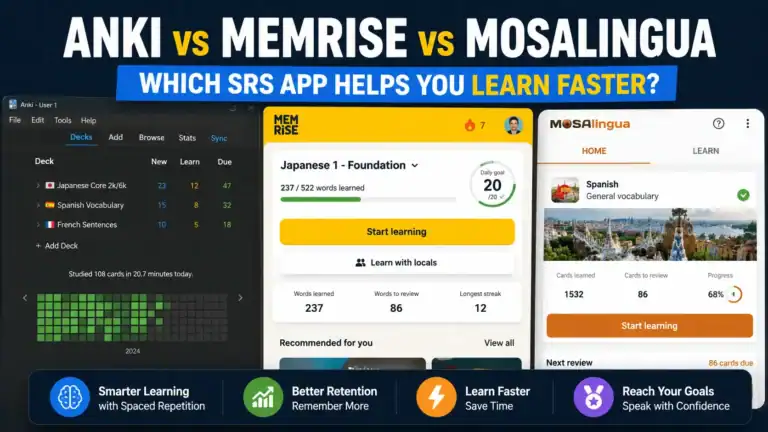
Memrise | Combines SRS with AI difficulty adjustment | Medium |
Lingvist | AI selects next word based on performance history | Medium |
Anki + FSRS | Modern algorithm with user-adjustable parameters | High |
A note on FSRS (Free Spaced Repetition Scheduler): the FSRS algorithm is a modern, research-backed scheduling system for Anki — built to replace the original algorithm Anki has used for decades. It adjusts review intervals more accurately based on how you actually perform, rather than applying the same formula to everyone. It’s available as a free plugin at fsrs4anki and is worth switching to if you’re already an Anki user.
Practical takeaway: if you want maximum control, Anki with FSRS gives you the most research-backed adaptive review available. If you want something that works without setup, Lingvist handles adaptation automatically from day one.
For a deeper comparison of Memrise alongside other vocabulary apps, the Best Vocabulary Learning Apps guide covers this in depth.
Conversational Drilling: Practising Words in Real Contexts
The fastest way to move a word from passive to active vocabulary is to use it under mild pressure — and AI chatbots create that pressure on demand.
Recognition (seeing a word and knowing what it means) is much easier than production (using a word correctly in context). Most vocabulary apps only train recognition. Conversational drilling with an AI forces production, which is where durable memory forms.
Simple prompt structures for vocabulary drilling:
- “I’m learning [language] at B1 level. Quiz me on these words: [list]. Ask me to use each one in a sentence and correct me if I’m wrong.”
- “Have a short conversation with me in [language] about [topic]. Use these words naturally: [list]. Stop and explain if I use them incorrectly.”
- “Give me a fill-in-the-blank sentence for each of these words and tell me if my answer is correct: [list].”
These work with ChatGPT, Claude, or any capable AI assistant — either typed or spoken.
Using voice mode for speaking practice: most AI assistants support voice input and output. On ChatGPT, tap the headphone icon to switch to voice mode. One thing that isn’t obvious until you’ve tried it — the default voice mode tends to correct your grammar mid-conversation, which breaks the flow. I have learned that a better approach is to add this to your prompt before switching to voice: “Don’t correct me mid-sentence. Let me finish, then give me one piece of feedback at the end.” That single instruction changes the session from stop-start correction to something that actually feels like a conversation.
Why output practice matters: Merrill Swain’s Output Hypothesis argues that producing language — not just comprehending it — forces learners to notice gaps in their knowledge and pushes toward accuracy. Conversational drilling activates exactly this process.
For a deeper look at using AI chatbots for language practice beyond vocabulary drilling, the AI Chatbots for Language Practice: Your 24/7 Conversation Partner builds this into a full framework.
Tracking and Diagnosing Your Weak Spots
The best use of AI isn’t just studying — it’s understanding why certain words aren’t sticking.
Most apps show a streak or a score. That’s motivating but not diagnostic. AI tools go deeper: they surface which word categories you consistently miss, flag words reviewed many times without improvement, and identify patterns across your errors.
What to look for in tracking features:
- Words flagged as “leeches” — reviewed repeatedly but still failed (Anki does this natively)
- Category-level performance across topics or word types
- Retention rate over time, not just raw cards reviewed
- Spaced repetition load — are you carrying more cards than you can sustainably review?
A simple manual diagnostic:
Export your failed cards, paste them into ChatGPT or Claude, and ask: “What patterns do you notice in these words I keep forgetting? What might be causing the confusion?” This surfaces connections your app’s analytics might miss — similar spellings, overlapping meanings, gaps in a specific grammatical category.
From experience, the pattern that shows up most often when you paste failed cards into an AI tool is semantic overlap — words that are close enough in meaning that your brain is storing them in the same slot. The AI will flag this immediately. The fix isn’t more repetition — it’s asking AI to generate a contrast sentence that uses both words side by side, which forces your brain to store them separately.
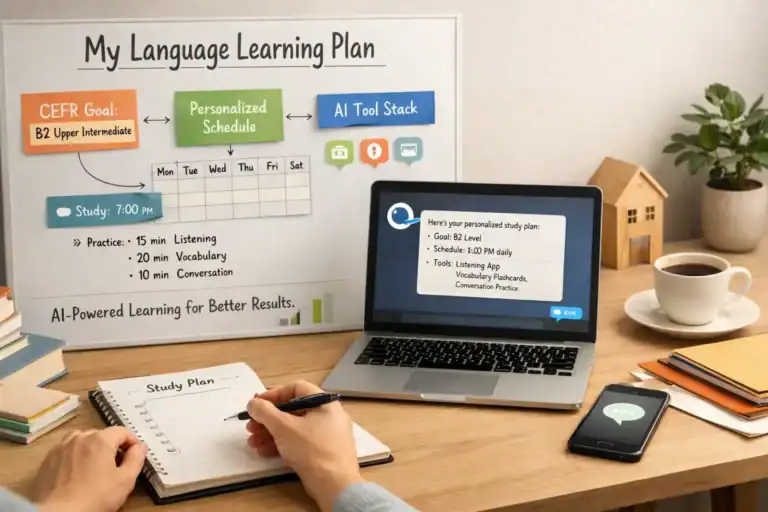
Feeding this diagnostic data into your study schedule is covered fully in the step-by-step guide AI language learning plan for building a structured weekly system around your weak spots.
A Practical AI Vocabulary Workflow
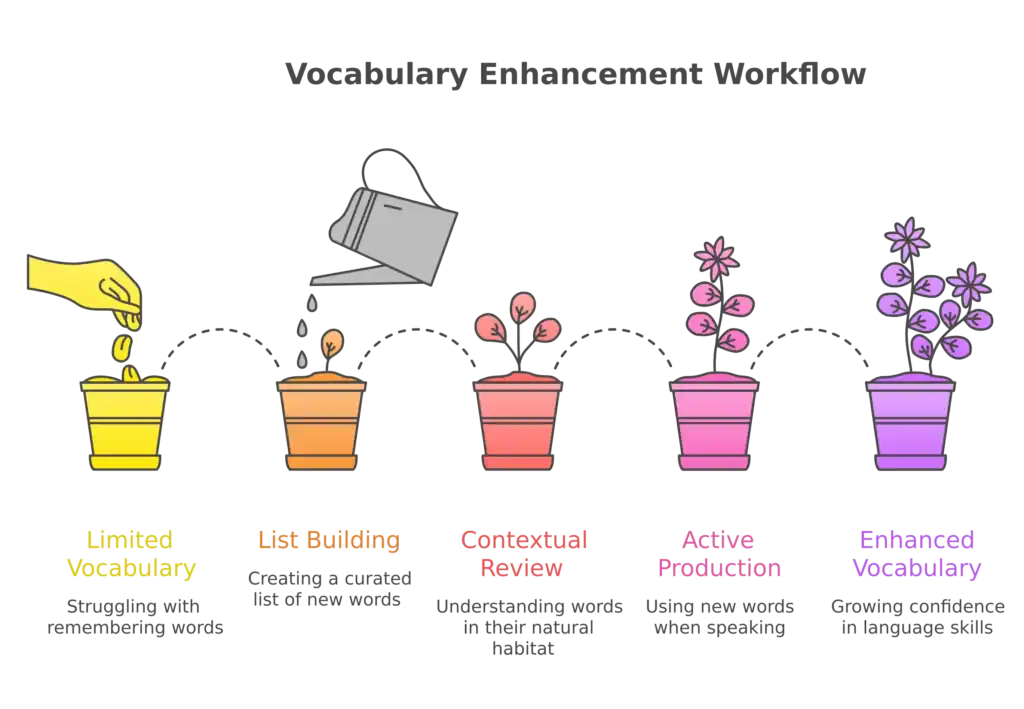
A good AI vocabulary workflow takes 15–20 minutes a day and combines three things: list building, contextual review, and active production.
Here’s a repeatable system across three levels:
Beginner (A1–A2)
- Use AI (ChatGPT, Claude (free tier) or similar) to generate a 20 word list around a single topic
- Import into Anki or add to Quizlet — let the app handle scheduling
- Daily: review flagged words; ask AI for one example sentence per new word
- Weekly: use a chatbot for a simple 5-message conversation using that week’s words
What to expect: Using this workflow consistently for four to six weeks — one topic-based word list per week, daily review, and a short weekly chatbot conversation — it’s realistic to build a functional vocabulary of 200–300 words in a single topic area. That’s enough to handle basic conversations around that topic with real confidence.
Intermediate (B1–B2)
- Extract vocabulary from content you already consume — articles, podcasts, shows
- Use LingQ for automatic capture, or paste transcripts into AI for manual extraction
- Import into Anki with AI-generated contextual cards; enable FSRS for adaptive scheduling
- Three times a week: conversational drilling session using your active word list
- Monthly: diagnostic review of leeches and failed cards using the manual method above
What to expect: Using the intermediate workflow consistently for six weeks — extracting vocabulary from content you already consume, running three drilling sessions a week — it’s realistic to move 150–200 words from passive recognition to active recall. That’s roughly the vocabulary gap between B1 and B2 in a single topic area.
Advanced (C1–C2)
- Focus on collocations and idiomatic use — prompt AI to show how words behave with other words, not just their definitions
- Use Clozemaster for high-volume cloze practice at advanced level — it exposes you to thousands of real sentences and is particularly effective for moving from B2 to C1. See also my detailed review of the app
- Use AI to write short paragraphs incorporating 5–10 target words, then rewrite them from memory without looking
- Focus conversational drilling on edge cases — register differences, near-synonyms, unusual collocations
What to expect: At advanced level the gains are less about volume and more about precision. Six weeks of consistent collocation work and Clozemaster drilling typically produces noticeable improvement in two specific areas: fewer hesitations when reaching for the right word in conversation, and more natural word choices that don’t sound like direct translations. Those are harder to measure than a word count but more meaningful in practice.
One practical note on Clozemaster: the default “most common” sentence setting is fine at B2, but switch to “random” once you reach C1. The most common sentences become predictable quickly and you stop actually retrieving — you start pattern-matching the sentence structure instead.
What AI can’t replace:
- Reading volume — encountering words naturally across varied contexts remains irreplaceable
- Real conversation — a chatbot is a useful approximation, not a substitute for speaking with people. A human tutor is better for nuance and natural usage correction.
- Time — AI improves the efficiency of vocabulary learning, not the timeline for true internalisation
Start With One Technique, Not Ten
The biggest mistake with AI vocabulary tools is trying to implement everything at once. Pick one technique from this guide — build a targeted word list, run a single drilling session, or try Lingvist for a week — and make it a habit before adding anything else.
Vocabulary is one piece of a larger system. Once your word base is solid, the question becomes how to build it into a complete approach that covers all four language skills — reading, writing, listening, and speaking. The Ultimate Guide to Language Learning Technology is the natural next step for that bigger picture.
Frequently Asked Questions
How many new words should I study per day with AI tools?
Research on working memory suggests 10–20 new words per day is a sustainable ceiling for most learners. More than that and retention drops sharply. AI tools make it tempting to add too many cards — resist it. Depth of engagement per word matters more than volume.
Can I use AI vocabulary tools without a paid subscription?
Yes. The most capable free combination is Anki (free on desktop, one-time fee on iOS) paired with the free tier of ChatGPT or Claude for card generation and drilling. Lingvist offers a free tier covering core features. Duolingo’s free tier includes AI personalisation.
Which AI vocabulary tool is most effective for intermediate learners?
Lingvist is worth trying at intermediate level — its AI selects words based on frequency and your performance history, keeping you in a productive challenge zone. Anki with FSRS is more powerful if you’re willing to invest in the setup. Consistency matters more than tool choice at this level.
Do AI vocabulary tools work for less common languages?
Major tools support widely studied languages well — Spanish, French, German, Mandarin, Japanese, Arabic. Support for less common languages varies significantly. Anki works for any language since you build your own cards. LingQ supports over 30 languages. Always check your specific language before committing to a paid plan.
How long before I see results?
Consistent daily study of 15–20 minutes typically produces noticeable improvement in 4–6 weeks at beginner and intermediate levels. Advanced learners see slower gains because each new word represents a smaller percentage increase in total vocabulary. The AI advantage shows most clearly in retention — words learned with contextual and retrieval practice stick longer than those from passive review.
What’s the difference between AI vocabulary tools and standard SRS apps?
Standard SRS apps apply a fixed spacing algorithm to everyone equally. AI vocabulary tools adapt to your individual performance, generate contextual content on demand, and can engage you in active production practice. SRS is a feature inside most AI vocabulary tools, not a competitor to them.
AI tools for vocabulary vs human tutoring — which is better?
They serve different functions. AI is better for high-repetition, low-stakes drilling at scale — you can do 50 retrieval attempts in 10 minutes. A human tutor is better for feedback on nuance, pronunciation, and natural usage. The most effective approach combines both. If you’re not yet working with a tutor, How to Find Your Perfect Online Language Tutor walks you through exactly what to look for.